Files Vault, Team Permissions, Client Groups & Portfolio Shift
1.28.0·
Happy New Year, everyone. This is our first major release shared through the new release notes, the place we'll keep you posted on what's new, what's improved, and everything happening across the platform.
We have a lot planned for the year ahead, and this release sets the tone for what's coming.
Files Vault: Secure Document Storage Built for Advisory Practices
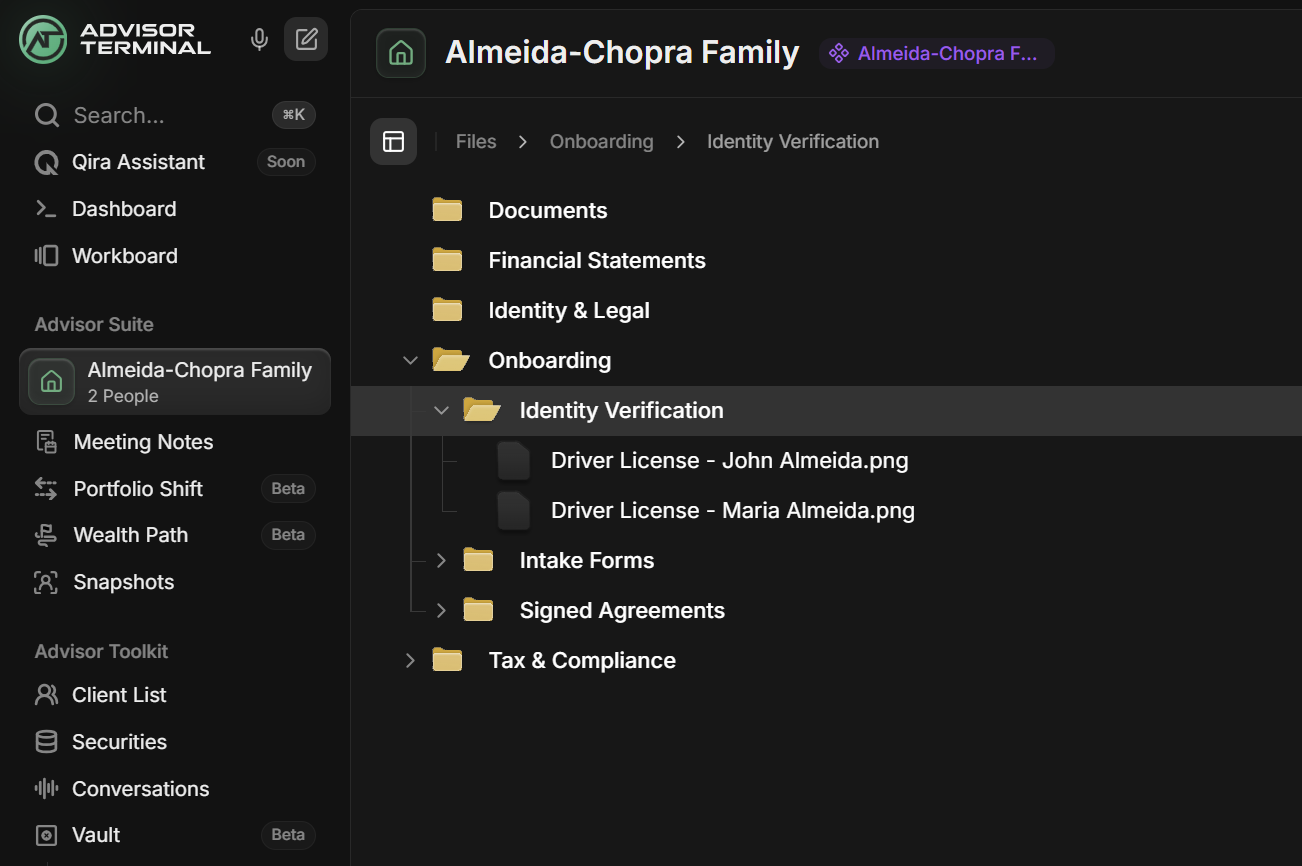
Files Vault is a unified place to store your firm's files, so you can finally replace tools like eFileCabinet, OneDrive, or Dropbox. With bank-grade encryption, branded client upload links, and deep integration with the workflows you already use, client documents now live right where you work.
- Dual vault system: Client Vault keeps documents tied to each household, corporation, or trust. Practice Vault stores firm-wide files like templates, procedures, and training docs.
- Branded secure upload links: Generate one-time links that let clients upload files directly to your vault without ever creating an account. They verify via SMS plus a separate security code you share, so no more sensitive documents over email.
- Task integration: Attach files directly to tasks. When clients complete an upload, a task is auto-created with the files attached and you get notified instantly.
- Folder templates: Create your standard folder structure once, apply it to existing clients, and auto-apply to new entities going forward.
- Bank-grade security: encryption in transit and at rest, proactive file validation that blocks executables before they reach your vault, and a full audit trail on every upload.
Team Permissions: Control Access Without Oversharing
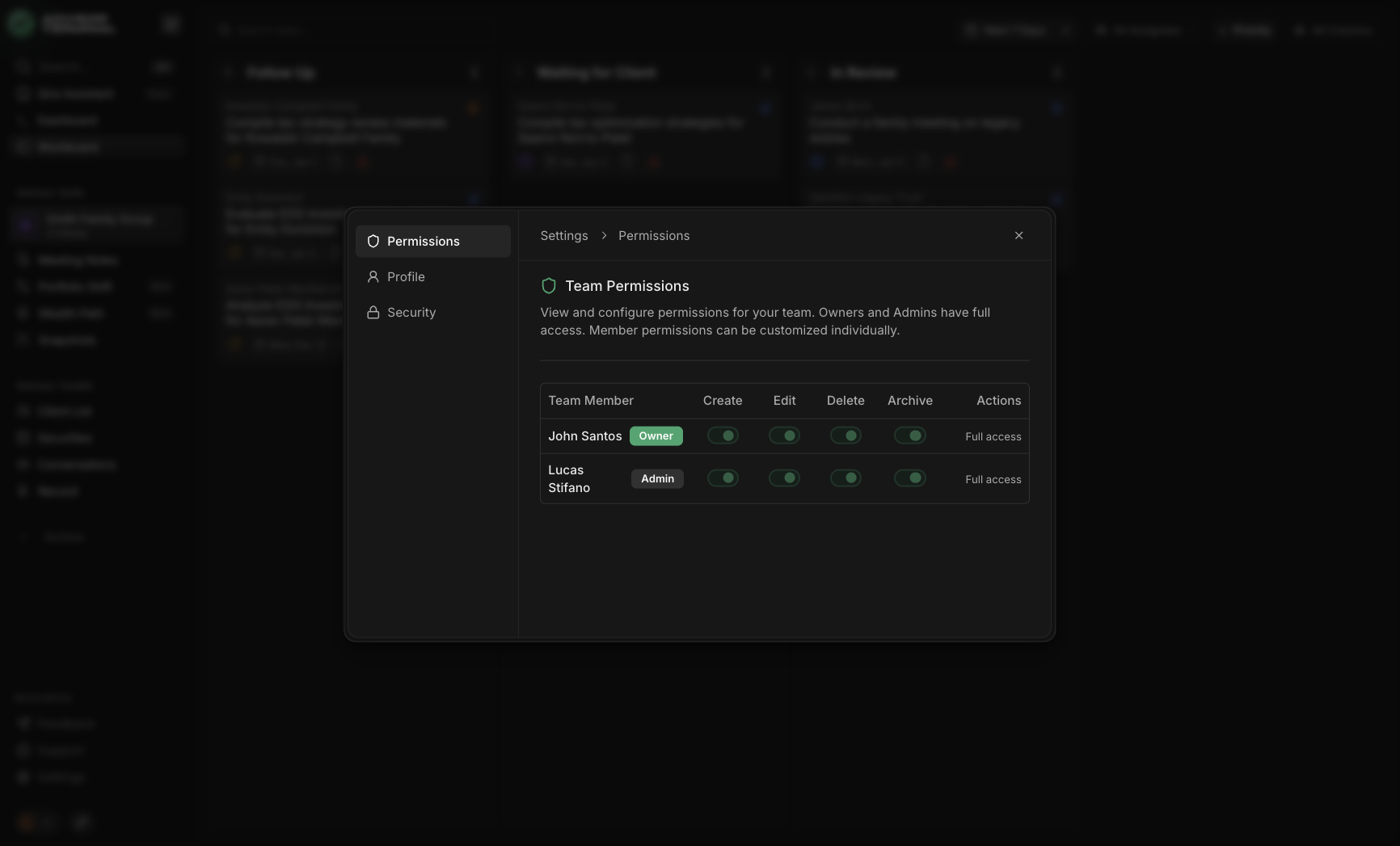
Delegation shouldn't mean oversharing. We've introduced role-based access control so you can manage two things separately: what each team member can do across the practice, and which specific client entities they can see. The result is cleaner collaboration, tighter privacy, and fewer mistakes.
- Team Access per entity: Every household, corporation, and trust can have its own visibility rules. If a team member doesn't have access, the entity doesn't appear anywhere. No profile, no tasks, no documents.
- Set access during creation: When you create a new entity, choose who should have access from the start with a Team Access section in the creation flow.
- Manage Access anytime: Responsibilities shift. Open any entity and update who can see it as your team evolves.
- View Only mode: For team members who should look but not touch, View Only provides a clean review experience where editing and destructive actions are simply unavailable.
- Practice-level permissions: Control what each team member can do across the entire practice from Settings → Permissions.
Client Groups: Manage Relationships the Way They Actually Exist
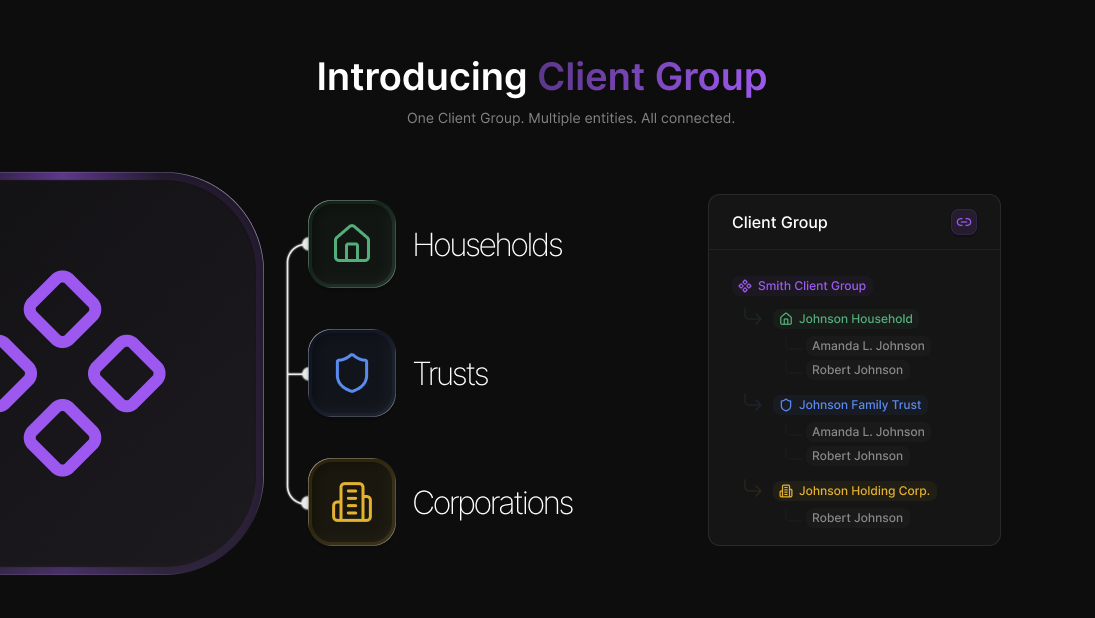
Most advisor software assumes one household equals one record. Real practices don't work that way. A single relationship can include a household, corporations, and trusts, all sharing people, responsibilities, and documents. Client Groups models these structures the way they actually exist, so your notes, tasks, and documents stay organized without duplication.
- Managed Entities: Households, corporations, and trusts each get their own record with the right context, while staying connected to the broader relationship.
- Entity Groups: Link related entities into a named group and view the full relationship from the top down, with documents, tasks, and activity in one place.
- Cross-entity roles: People can appear across multiple entities with different responsibilities. Your team stops guessing who is connected to what.
- Meeting notes that match reality: Create a single meeting note and link it to multiple entities discussed in the same conversation. Cleaner records, reduced compliance risk.
- Privacy controls: Practice owners can hide specific entities from selected team members. Hidden entities behave as if they don't exist for that user.
Portfolio Shift: Unified Rebalancing for Funds, Stocks, ETFs, Cash & Tax
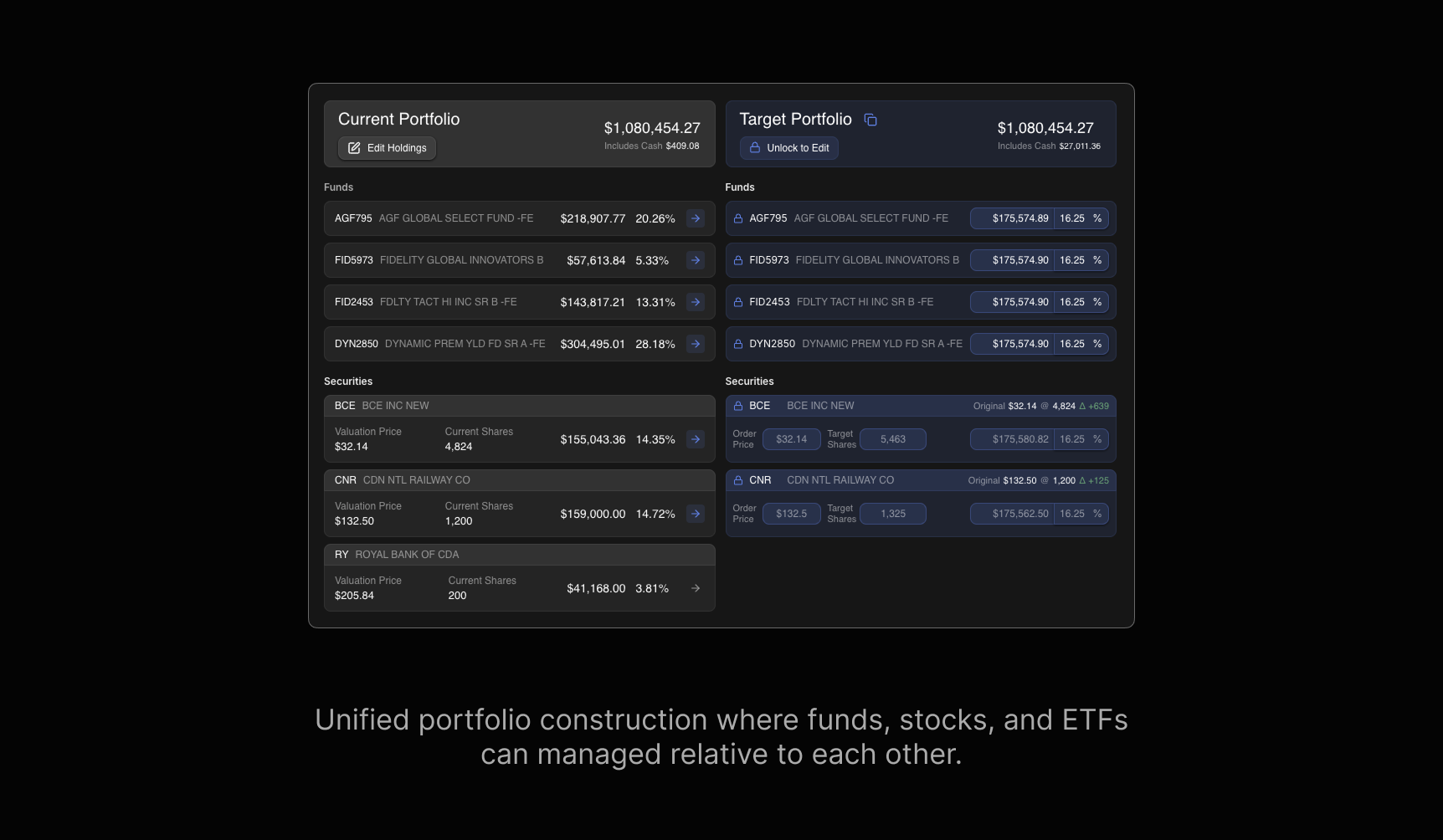
Portfolio Shift has grown from a mutual fund rebalancer into a complete portfolio construction engine. You can now handle funds, individual equities, ETFs, real-world cash constraints, and the tax impact of your trade plan, all in one workflow. If you've been juggling separate spreadsheets for stocks, funds, cash, and tax, this replaces that patchwork.
- Unified target portfolios: Mutual funds, ETFs, and individual stocks can sit in the same target portfolio. Funds use fractional units, equities and ETFs use whole share rounding with remainders moved to cash.
- Cash management: Set a cash reserve by dollar or percentage, then watch projected surplus or shortfall update in real time as you adjust targets. No more manual Excel math.
- Spread & Equalize modes: Spread distributes surplus or shortfall across unlocked positions. Equalize sets all unlocked positions to the same weight. Both respect your cash reserve and locks.
- Valuation vs order price: Separate the price used for current value from the price you expect to trade at. Get realistic share counts and cash usage that match what you'd actually place.
- Tax impact estimator: For taxable accounts, estimate realized gains or losses and the resulting tax payable before you commit. Set inclusion rate and marginal rate to see per-trade and summary impact.
- Flexible CSV import: Map columns once with custom templates, then auto-apply to future imports from the same dealer. Edit holdings and add pending deposits before building targets.
New Features
- Confidence in Every Click of "Record". Recordings save as you go, so a dropped connection or closed tab never costs you a meeting.
- One-Click Cleanup for Leftover Cash. Clear small cash discrepancies in a click, with clearer trade feedback and smoother forms.
- Control Which Clients Each Teammate Sees. Decide which clients each team member can see across every module.
- Estate Review Comes to Snapshots. Capture will details, executor info, power of attorney, digital assets, and care preferences in one place.
- Search Securities by Symbol or Name. Find a security by its ticker symbol or its full name.
- Start Typing Right Away on New Documents. The title field is ready the moment you create a document, so you can name it without an extra click.
- Cleaner Practice Metrics. Dashboard metrics now count active clients only, with prospects shown separately.
- Search Securities When Adding a Position. Find a security by symbol or name as you add it to a portfolio.
- Color-Coded Client Icons in Document Lists. Document lists now show color-coded client icons with participants grouped together, so the right record is easy to spot.
- Snapshots Overview: Faster Copy, Clearer Totals. Copy any value in a click, see net liquid and fixed totals, and spot notes at a glance.
- Spread Cash by Position Weight. Distribute net cash across positions by their weight instead of evenly.
- Sort and Search Archived Tasks. Find archived tasks fast with search and five sorting options.
- See Roles When Choosing Participants. Each person's role now shows as you pick participants for a document.
- Fine-Tune What Each Teammate Can Do. Turn specific actions on or off for each team member from your settings.
- Press Enter to Post a Comment. Hit Enter to send a task comment, or Shift+Enter to add a new line.
- Track RESP Accounts. Add Registered Education Savings Plans to a client's financial assets.
- Find Anyone by Name in Global Search. Search across all your clients to jump straight to a person by name.
- Search Your Archived Tasks. Filter archived tasks by title, client, or person name.
- Allocation Status at a Glance. See your allocated percentage, cash percentage, and balance status right from the sidebar.
- View-Only Access Across Every Module. Team members with view-only access now get a clean, read-only experience everywhere in the app.
- Know the Moment New Features Ship. A gentle badge and a What's New panel let you know as soon as something new lands.
- Sort Archived Tasks by Date Archived. Sort archived tasks by when they were archived to find recent completions fast.
- Start with Cash for Portfolio Shifts. Begin a portfolio shift from a starting cash balance, with no file import required.
- Filter Tasks by Team Member. Filter active and archived tasks by who they're assigned to, so you find work faster.
- Printable Blank Meeting Notes Template. Print a blank meeting notes form to fill in by hand during a client meeting.
Improvements
- Cleaner Edit Forms. Edit forms no longer show placeholder text on top of the information you've already entered.
- Clearer Task Sorting. Task sorting now has clearer labels and reliable direction, so you always know how the list is ordered.
- Calendar Dates on Older Items. Older documents and activity now show their actual date instead of a vague relative time.
- Fewer Trades for Small Leftover Cash. Allocating small leftover amounts now picks funds smartly to keep the number of trades down.
- Submit Comments Without Leaving the Keyboard. Use Ctrl+Enter or Cmd+Enter to post a comment in one keystroke.
- Polished PDFs for Meeting Notes. Meeting notes now export as clean, professionally styled documents.
- Cleaner Contact Details. Action buttons on contact details now appear on hover, so the view stays calm and uncluttered.
Fixes
- Penny-Accurate Portfolio Totals. Portfolio totals now add up exactly, with no rounding pennies left over.
- No More Stale Documents When Switching Clients. Moving between clients now loads the right documents instead of leftover data from the last one.
- Correct "Move to Tomorrow" Tooltip. The task scheduling tooltip now reads "Move to Tomorrow" as expected.
- Phone Numbers Save to the Right Field. Phone numbers now show the correct label and save where they belong.
- Full Transcripts, Nothing Cut Off. The transcript viewer now shows every line without clipping the bottom.
- Find Client Groups in Global Search. Global search now surfaces client groups alongside everything else.
- Accurate Over-Allocation Highlighting. Over-allocation now highlights based on actual dollar amounts, so the warning matches reality.
- Sell-All Trades Now Read "ALL". A full liquidation now clearly shows "ALL" instead of a unit count.
- No More Autosaves on Documents You Didn't Touch. Opening a document no longer triggers a save when you haven't changed anything.
- Unlock Works When Everything Is Locked. The unlock button now works correctly even after every position is locked.
- Active Tasks Tab Always Responds. The Active Tasks tab in the client sidebar now responds to your click even when it's empty.
- The Right Recordings for the Right Client. Transcription tabs now show only the recordings that belong to the client you're viewing.
- Unlock One Position After Locking All. After you lock every position, you can now unlock them one at a time.
- Full Security Names in Portfolio Shift. Portfolio Shift now shows each security's full name instead of just its ticker.