
A rebuilt dashboard and the new Contact List
1.5.0·
Version 1.5 is a big one for the part of Advisor Terminal you see first.
We rebuilt the dashboard from the ground up, so a single glance tells you where your practice stands. And we added Contact List, a dedicated home for every professional relationship that supports your business. Here is everything that is new.
A dashboard that briefs you in 60 seconds
We rebuilt the dashboard around a simple goal. It should give you a complete read on your practice in under a minute. It is now one scannable briefing, top to bottom, starting with how your book is doing and ending with exactly what needs your attention today.
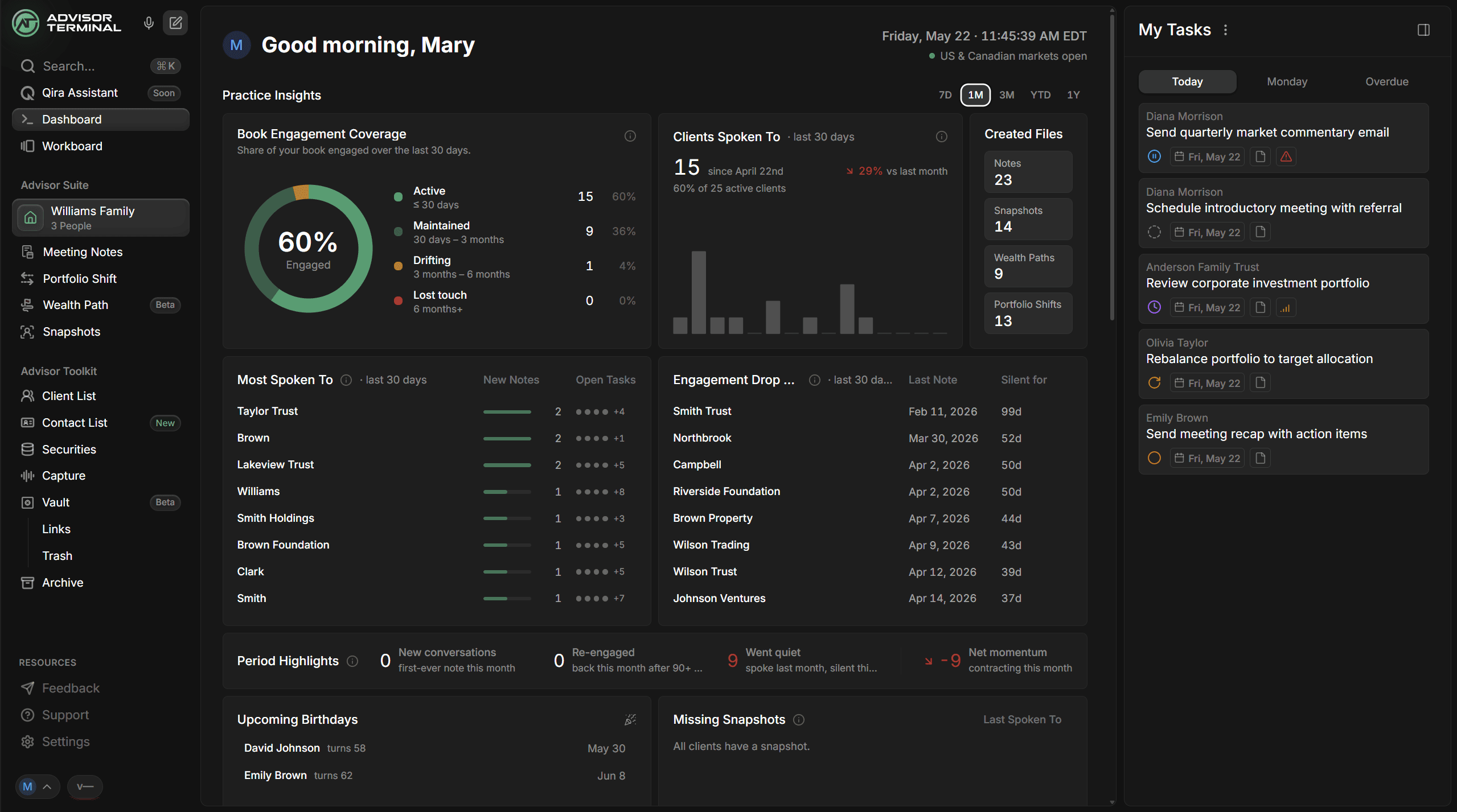
Practice Insights leads the page. Choose a window, the last 7 days, 30 days, 3 months, year to date, or a full year, and the whole section answers one question: how well are you staying in front of your book?
- Book Engagement Coverage shows the share of your clients you have genuinely kept in touch with, sorted into Active, Maintained, Drifting, and Lost touch tiers.
- Clients Spoken To counts the unique clients you have met with over the period, with a trend chart and a comparison against the period before.
- Most Spoken To and Engagement Drop Off put names to it: the clients you have been closest to, and the ones who have gone quiet the longest.
- Period Highlights sums up the movement in your relationships, new conversations, clients re-engaged after months of silence, clients who went quiet, and a single net momentum number.
- Missing Snapshots surfaces the clients you speak with most who still do not have a financial snapshot built.
- Upcoming Birthdays keeps the next month of client birthdays one glance away.
Below that, Activity and Movements keeps the day's loose ends in view. Your Practice Workstream lists the latest notes, snapshots, wealth paths, and portfolio shifts across the team. Recent Uploads gathers the files clients have sent in through your shareable links. And the Capture Audit flags recordings that still need a household linked or a meeting note generated, each with a one-click button to turn it straight into a task.
Workboard Analytics closes the page. Task Efficiency shows who is moving work and at what pace. The Workboard Risk Manager carries a single pulse indicator, All Clear, Watch, or Action Needed, so you instantly know whether anything is on fire, then breaks risk down by category and by team member so you know exactly where to look.
A sidebar runs down the right edge the whole way. By default it holds your own Today, Tomorrow, and Overdue tasks. Click into any risk category or any teammate and it becomes a focused list of exactly those tasks, without ever leaving the dashboard.
Contact List, a home for everyone who is not a client
Your practice runs on more than your clients. Centers of influence, the accountants and estate lawyers you trade referrals with, wholesalers, the colleagues inside your own firm. Until now, Advisor Terminal had nowhere to keep them. Contact List is that place: a clean, searchable directory for every professional relationship that supports your business.
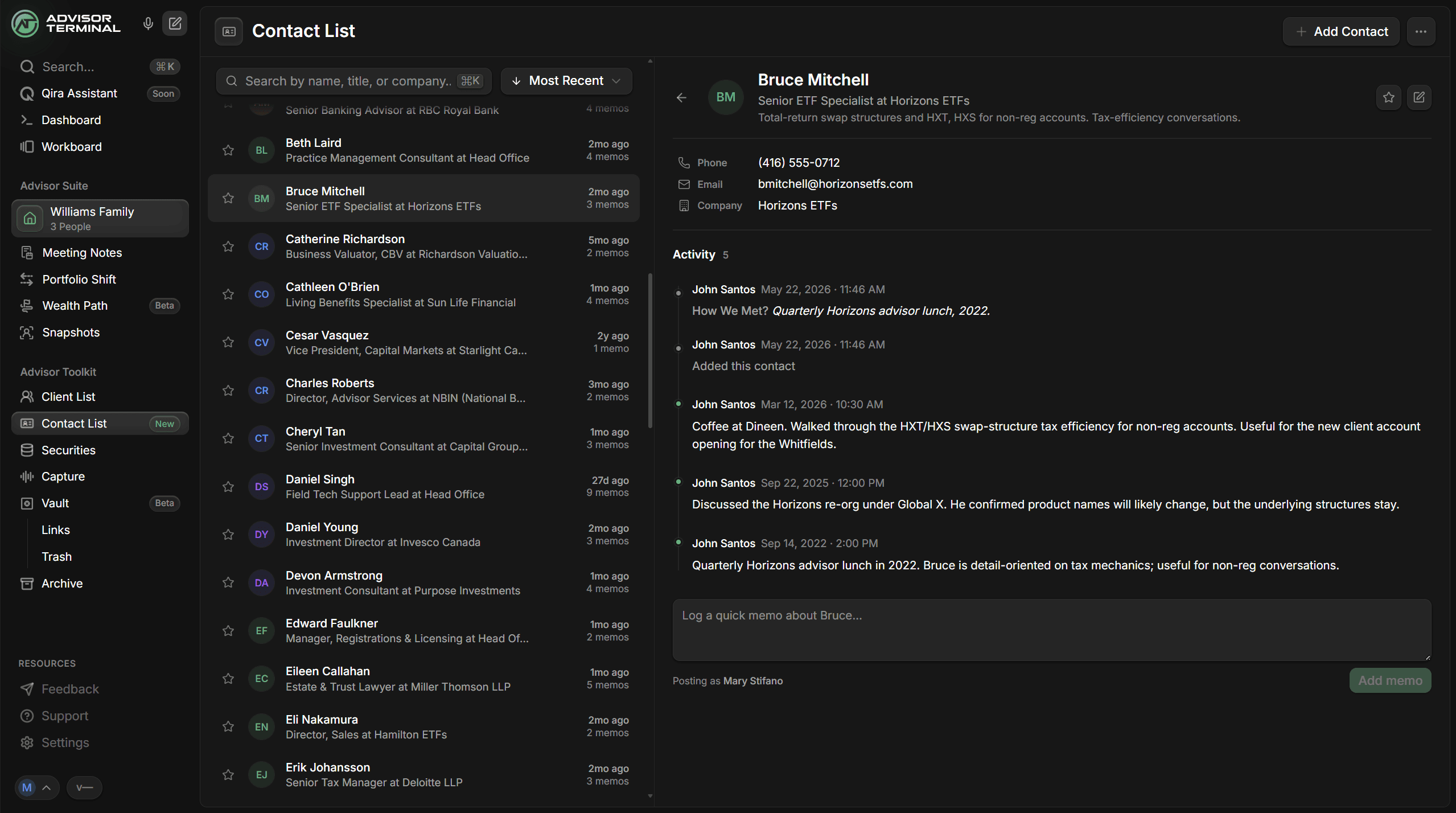
- A real profile for every contact. Name, title, firm, two phone numbers and two email addresses, plus a headline for the context you want kept front and center.
- A memo timeline. Log a quick note whenever you speak with a contact. Each memo records who wrote it and when, building a running history so the relationship has a memory instead of just a phone number.
- How We Met. Capture the origin of a relationship once and it stays pinned to the contact's activity, so you never lose track of where a referral source began.
- Favorites, search, and archive. Star the people you reach for most, find anyone instantly with Cmd+K, and archive contacts you do not need day to day without losing any of their history.
- Shared across your practice. Contact List belongs to the practice, not a single login, so your whole team works from the same directory.
You will find Contact List in the sidebar, under Advisor Toolkit.
New Features
- A home for your professional contacts. Keep every center of influence, wholesaler, and partner in one searchable place your whole team shares.